3D Camera &
3D Camera Studio

3D Camera
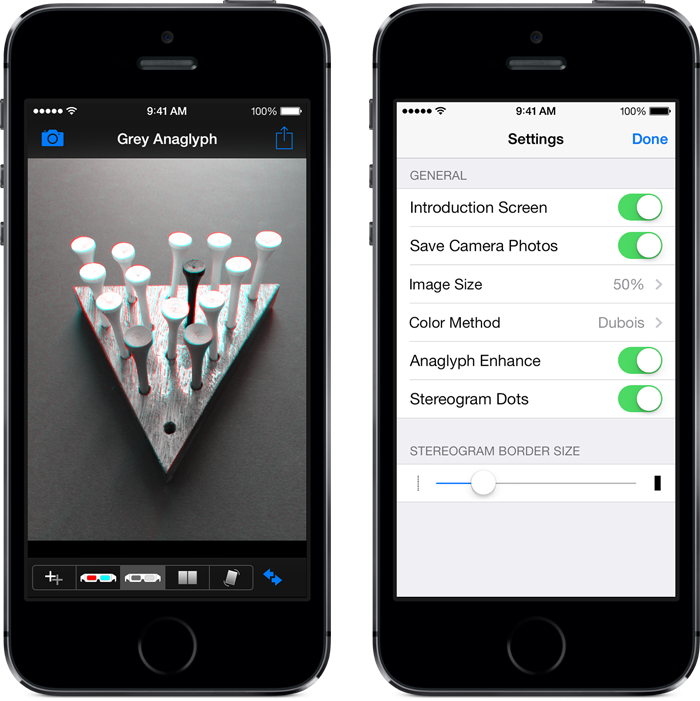
Create your own 3D photos and easily share them with friends on Facebook and Twitter. First, take left and right photos with the built-in camera or choose two images from your iPhone or iPod touch photo album. Then, view your 3D photo as a grey or color anaglyph (using common red/cyan 3D glasses), a stereogram (no glasses required), or as a “wigglegram” for a simulated 3D effect. Finally, send your 3D photo to your friends on Facebook and Twitter. It’s as simple as that!
Visit our 3D Camera page on Facebook.
Features
- Enhanced camera that makes it easy to take two side-by-side photos
- Three different camera alignment modes
- Ability to send 3D photos to Facebook, Twitter, and e-mail
- Wirelessly transmit images to 3D Camera Studio for iPad
- Use flash and the front camera (on supported devices)
- Simple touch interface to realign and reposition images
- Magnification loupe for more accurate alignment
- Automatic cropping of re-aligned images
- Grey and color anaglyph creation
- Parallel and cross-eyed stereogram support for photos that don’t require 3D glasses
- Wigglegram mode for a fun, simulated 3D effect
- Integrated instruction screen with “More” button to access an online video tour and additional documentation
- Button to swap the original photos
- App setting to choose the working image size (100%, 75%, 50%, 25%)
- App setting to enable/disable automatic saving of camera photos
- App setting to automatically boost saturation and brightness of Color and Grey anaglyphs
- App setting to control the size of stereogram borders (and to eliminate them)
- App setting to enable/disable stereogram alignment dots
- App setting to limit the maximum Twitter image dimensions (1024, 800, 640)
- App setting to select the color anaglyph method (full color, half color, optimized, red/blue, and Dubois)
- App setting to bypass the introduction screen

3D Camera Studio
3D Camera Studio is the easiest way to create 3D photos on your iPad.
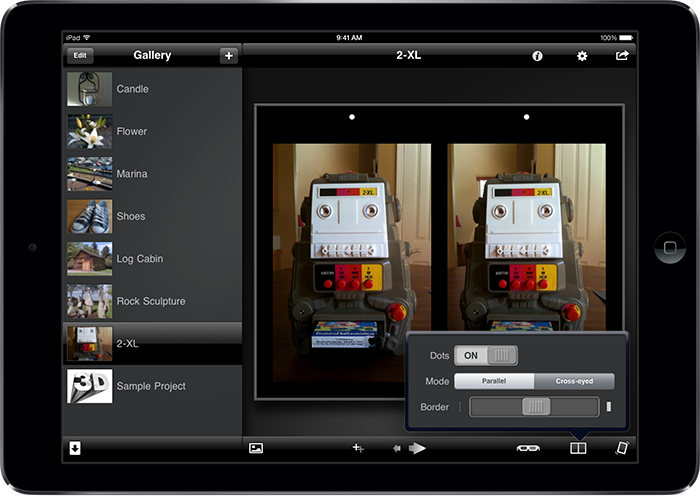
Based on the popular 3D Camera app for iPhone and iPod touch, it has been completely redesigned to take full advantage of the larger iPad screen. Featuring a project gallery, a simple alignment mode, wireless image transfer, advanced export to JPS, PNS, and MPO files, and an intuitive interface, it is a powerful tool for creating 3D anaglyph, stereogram, and wigglegram images.
Features
- Built-in gallery to manage your projects
- Wireless image transfer from the full version of 3D Camera for iPhone and iPod touch
- Simple touch interface to realign and reposition images
- Magnification loupe for accurate alignment
- Recede and pop out buttons to quickly modify image depth
- Automatic cropping of aligned images
- Five anaglyph creation methods: grey, full color, half color, optimized, and red/blue
- Optional anaglyph enhance mode to automatically boost saturation and brightness
- Parallel and cross-eyed stereogram support for photos that don’t require 3D glasses
- Optional stereogram alignment dots
- Full control of stereogram border size
- Wigglegram mode for a fun, simulated 3D effect
- Control of wigglegram animation speed
- Integrated help that changes based on the current task
- Advanced mail mode that exports Stereo JPG (.JPS), Stereo PNG (.PNS), and Multi-Picture Format (.MPO) files
- Ability to copy 3D images to the pasteboard for use in other apps
- Ability to save to the iPad photo album
- Ability to send 3D images via e-mail
- Built-in feedback button to contact us directly with comments or questions
Icons by Joseph Wain / glyphish.com